Sunday, May 22, 2016

A quick and dirty medical dictionary for your Mac

I work on a lot of health IT projects at work and, as such, I face a constant stream of red squiggles provided by the spellcheck utilities of almost every major editor.  Over the years, I've built up quite a few 'User Dictionaries' by adding terms to each spellchecker one-by-one.

Today, I decided to look into whether my Mac offers a more centralized user dictionary to see if I might pre-populate it with all these medical terms instead.  Answer: Yup. And its just a simple text file with one term per line.

Now this is where the little-known SPECIALIST Lexicon from the US National Library of Medicine comes in.  The lexicon is a freely available "syntactic lexicon of biomedical and general English" that includes terms in the following format:
{base=cotton roll gingivitis
spelling_variant=cotton-roll gingivitis
entry=E0000001
        cat=noun
        variants=glreg
        variants=uncount
}
{base=2060 virus
entry=E0000010
        cat=noun
        variants=reg
}
...
There may be a version with one term per line, but I figured it would be easier just to use some unix-fu to get it in the right format.  So, if you're following along, simply open a Terminal and do the following:

1. Navigate to the latest Lexicon release and download the Lexicon (text) by right-clicking the link and choosing the appropriate save option (don't left-click/navigate to the link unless you want your browser to hang for a bit...the file is fairly large).

2. Make a LocalDictionary backup (optional)
If you already have a LocalDictionary, you may want to back it up first in case something goes wrong:
cp ~/Library/Spelling/LocalDictionary ~/Library/Spelling/LocalDictionary.backup
3. Navigate to where you downloaded the LEXICON file and add the terms from it
Perhaps a little dirty, but I don't think this LEXICON format has changed in like 10 years, so here are a couple lines to add the terms to your Local Dictionary in the proper format:
grep "{base=" LEXICON | cut -c 7- >> ~/Library/Spelling/LocalDictionary
grep "spelling_variant=" LEXICON | cut -c 14- >> ~/Library/Spelling/LocalDictionary
4. Sort the terms
According to that tutsplus article I linked earlier, the Mac spellcheck file needs to be sorted alphabetically.
sort -o ~/Library/Spelling/LocalDictionary ~/Library/Spelling/LocalDictionary 
If you made a LocalDictionary backup, I won't tell you to go delete it yet because I've only just made the change and so I'm not sure whether having an 8 MB LocalDictionary will have any downsides, but so far it seems to be working.

Friday, January 22, 2016

Training your digital assistant

Despite reading articles like http://www.wired.com/2015/09/voice-interface-ios/, every time I use a digital assistant application to interact with my device, I'm reminded of how limited they really are. Still useful for a certain set of commands (notes, reminders, factual questions, etc.), but not even close to the type of "conversational computing" imagined in videos like http://blog.ibmjstart.net/2016/01/07/why-being-able-to-talk-to-your-computer-may-change-your-life/

So what I'm asking for is much simpler; just let me easily program a set of voice commands for my own device. Or, more precisely, let me teach my digital assistant how to interpret my words over time. When you search google about training a digital assistant like Siri or Cortana, all the information seems to be about training the voice recognition.  But thats only a small part of the problem.  Why isn't it easier to create simple verbal commands to trigger a specific action on your device?

For example, if there is an app I use a lot, I should be able to set a verbal launch command (without buying a 3rd party app launcher).  I should be able to record "macros" of events on the phone and then assign a verbal command to replay that exact set of events (e.g. open an app, click a button in the app, swipe to the second tab/screen of it).

Basically, I think the voice recognition should evolve with me to understand the types of things I'm likely to ask for. If it misinterprets what I'm asking for, I should be able to give it a simple piece of negative feedback so that it can try a different interpretation in the future. Or better yet, it could learn to measure its success based on my implicit feedback (if I redo a very similar command, I'm probably looking for a different result).

I really do hope that WIRED article is right and that smarter digital assistants are right around the corner, but I wouldn't hold my breath. If they do arrive, we'll just have to solve that silly little problem of getting people more comfortable with talking to their devices.

Training the next generation to dictate

Recently, I've shared some thoughts on the current user experience of digital assistants like Siri and Cortana.  A couple years ago, I bemoaned the lack of a more direct voice-to-system channel in our modern consumer technology:
http://parenthetical-thoughts.blogspot.com/2013/11/walkie-talkie-ultimate-phone-experience.html

One of the reasons I'm so stuck on this is that I feel like we finally have the technology to make conversational computing a normal mode of interaction with our devices.  I've been surprised to see that so many people are carrying smart phones and yet very few "normals" are using voice input.

I doubt that many would disagree that mobile devices are not good for typing. And yet, much to my surprise, younger generations have turned to text messaging as a primary form of communication, defacing the english language to make it slightly less painful to type their messages on their tiny little devices.

Sure, there are many contexts in which a voice input channel doesn't make sense, but I would argue that much of the time it does. So, if dictation is a better, more efficient, input mechanism for the majority of users, in the majority of cases, why isn't it more common? One explanation for this is that dictation is hard.

When I'm driving and try to dictate an email, text message, or note on my phone, its always full of stutters and breaks. To do it properly, I need to think out my entire sentence before I verbalize it to my device. While typing, I find it much easier to finish the thought in the midst of entry. Its funny how different it feels to talk to your device than it does to talk to a person...even if that person is not in the same physical location.

My theory is that this is learned, societal behavior. Further, I suspect that if I started dictating at a very young age, that dictation process would feel much more natural. Has anyone done an experiment like that? I'm seriously considering teaching my daughters to get into the habit of talking to a device just to see...maybe some kind of diary app?

Self-aware digital assistants

Knowing others is intelligence; knowing yourself is true wisdom.
                                                                                      - Lao Tzu

Does anyone else find it annoying that the digital assistants that are built into modern consumer technology (like Apple's Siri and Microsoft's Cortana) can answer questions about the world, but when you start to experience problems with your device they are the least helpful "person" in the world?

I recently upgraded to Windows 10 at home and I think the first 3 times I used Cortana, I tried to ask her questions about my installation.  Here are the type of questions I expect a smart digital assistant to be able to answer:

1. Is everything OK?  (did the installation go smoothly?  any errors/warnings I should know about?)
2. Why is my computer/phone going so slow?  (what is the current bottleneck?  CPU?  Memory?  What is using all the resources?)
3. Why am I out of disk space?  (what is the largest set of folders and files in my system?)
4. Why aren't my speakers working?  (scan device drivers, tell me what speakers are/aren't connected/make suggestions)

Questions like this might not be sexy, but I think it will feel natural to ask your phone/computer about itself.  Maybe digital assistants like Siri and Cortana should spend some time learning about themselves before they turn outward and help their users...

Tuesday, November 17, 2015

Personal searches from the address bar in Firefox and Chrome

Most modern browsers allow you to invoke the default search engine directly from the Address bar (aka the awesome bar or the omnibox), but did you know that you can easily access other search engines from the very same box? Assigning a keyword for alternate searches will allow you to invoke that search directly from the Address bar by typing the keyword, followed by a space and then the search query.

When paired with a shortcut to jump to the Address bar (e.g. Control + L), these keyword searches make for great workflow in the browser.

Adding new keyword search is easy: simply right-click on any search box and choose Add As Search Engine (Chrome) or Add a Keyword for this Search... (Firefox). Use the Keyword field to give the search a short handle that you can quickly type into the address bar to prefix your search.

How It Works

In both Chrome and Firefox, the URL field is the secret to making this work. The browser will automatically replace the "%s" string with the contents of your search query, meaning you can define a custom search for just about any URL.

To edit a keyword search, or to create your own from scratch, the process varies a little between the two broswers:

  • In Chrome, right-click the address bar and select Edit Search Engines...
  • In Firefox, the keyword searches are managed as bookmarks and can be created/edited from the manage bookmarks dialog.

My Searches

Full disclosure: the real reason I wrote this post is to document my keyword searches for future me. If you are a web developer or happen to use the same services as me, then maybe you can benefit from them too:

Site Keyword URL
Wikipedia wp http://en.wikipedia.org/w/index.php?title=Special:Search&search=%s
Delicious (links) d https://delicious.com/lmsurprenant/%s
Stack Overflow so http://stackoverflow.com/search?q=%s
Mozilla Developer Network mdn http://mdn.io/%s
Node Packaged Modules npm http://node-modules.com/search?q=%s
Evernote ever https://www.evernote.com/Home.action?offer=www_menu#n=056dfe4a-e94a-4d9f-8e49-cac92a0d21bb&ses=1&sh=5&sds=5&x=polygraphy&

Note that the Evernote one is custom. To create one for your own account, try the following:

  1. Log in
  2. Do a search
  3. Find and replace your query with "%s"

I don't understand why they make that so hard, but at least it seems to work (an improvement from a year ago):

Tuesday, August 11, 2015

Being a good Netizen

If your job involves working on a computer all day (especially if you are in the technology business), then you probably couldn't do your job without the world wide web.  Please consider it your duty to give back.

As knowledge workers, we are trained to pull information from across the web and combine it with our own knowledge and experiences.  On some problems, good information is easy to find.  On others, you need to invest significant effort to figure it out.  In the latter case, post your insights back to the web.

With social media (and modern software development), this is easier than ever.  Try to link your post to the most authoritative place for the subject at hand.  If you cannot post it in-context, then provide enough context so that someone reasonably familiar with the topic could understand what you are saying.

This will make the content searchable and it will help both you and others.  The harder it is to find good info, the more time you spend on research, the more obscure your insights, the more important it is to post.

It sounds obvious, but I'm amazed at the number of engineers I've worked with that will spend significant time figuring something out, and then simply move on to the next problem without committing their findings to the public record.  When I do that, I'm doomed to repeat the exercise all over.

Leave the web a little better than you found it.

Tuesday, November 19, 2013

Walkie-Talkie - The Ultimate Phone Experience?

The trouble with smart phones is that its hard to input text. I seem to be especially bad at this.
First on Android, and now iOS, they have built-in a microphone button on the on-screen keyboard to enable voice-to-text (dictation). I think this is the future I want to live in, but the thing is, I'm not very good at this dictating either.

I wonder if future generations will become very good at dictating or if its so socially unacceptable that our race is destined to be typing on these screens forever.

In any event, my issue with this voice-to-text button on the keyboard is that its buried on the keyboard. What I really want is something I can do without looking at the screen at all.  Like "touch-typing" on a keyboard.

For instance, in the car, I can't afford to look down at my phone. And don't even get me started on our Ford Escape with Microsoft Sync...

Anyway, it turns out that holding the iPhone button to get to Apple's Siri gets me 'close' to what I want, but I think there's lots of room for improvement. I don't want to hold the button for a second before I can start talking. And I don't want Siri to listen for a while until she thinks I'm done...only to tell me that my request didn't make sense to her.

On my friend's new Android, the phone is "always listening".  This is kinda cool (and kind of creepy), but you need to wake it up by saying something like "OK Google" which makes you feel a bit ridiculous in public (and maybe even in private).

On my ideal phone, I would instead have a physical button on the side that is devoted to voice input.  This button would work like a walkie-talkie (or, perhaps less antiquated, something like that Sprint/Nextel "push to talk" feature).  Only, instead of talking to a friend or a group of co-workers, I would push the button to talk to my digital assistant on the phone (Siri or Google Now). When I push the button, the phone listens.  When I release the button, the phone stops listening. Its that simple. Why has no one done this?!

Aside from the physical button, I think we need all-around better conversational AI (or even just better screen-reader technology).  Its really sad to me that GOOG-411 was actually better for in-car use that my JellyBean Android phone.

First one to make a phone like this will get my $.
*kshhhhh* Over *kshhhhh*

Thursday, November 14, 2013

The real hype cycle


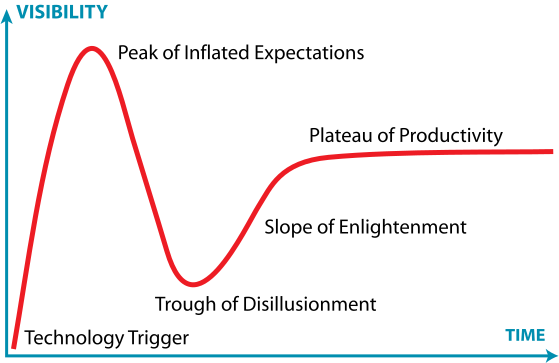
According to Gartner, all technology goes through a hype cycle in the marketplace as it matures.  It may be one of their most popular analysis pages (that or their 'magic quadrant' work).

But this isn't quite right.  Everyone that's been in IT long enough knows that almost every technology (no matter how innovative) has its roots in some other idea/technology years before. It may have a new name. A new use case. A new distribution channel. But the technology just isn't that new.

So, I conjecture that the 'true' hype cycle doesn't end in the "Plateau of Productivity" but instead it is truly a cycle...with each iteration feeding into a NEW technology trigger (anywhere from 5-20 years down the line):


The Federal Internet Identity Service

I have been doing some learning about Trust and Identity on the internet recently, particularly the new web-style standards like OpenID, Information Cards, etc. This got me thinking (dangerous, I know)...

What if the US Government acted as trusted 3rd party? They could assign a public/private key pair to every citizen (almost like a social security number) in order to provide verification services.
Maybe they could even offer something like an OpenId server as well.

If every citizen had a secret private key, that would enable you to digitally sign anything and anyone could verify it with a high degree of trust. In fact, verifying someone's identity would be as simple as checking their signature with the government service.


Then again, pretty sure no one trusts the government except me...

Pasting sample code into Eclipse

I recently discovered a very cool feature of the Package Explorer in the Eclipse IDE. Namely, if you copy the source for some class (say from a tutorial website), you can simply paste it directly into the Package Explorer view.  It doesn't even have to be a full class.  If its a snippet of code, Eclipse will create a new class file called snippet and add the code into it.  Very cool.

The Cancel Cancer

Few things in computer program usage irk me the way a broken/unresponsive cancel button does. When I click "cancel" in a dialog, the dialog should instantly respond (preferably by just going away) and all the resources/jobs should be finished/closed in the background. I understand that this can be a tricky feat to pull off in some cases, especially with long-running processes, atomic transactions which require some sort of rollback, or processes that require external communication (i/o or remote requests), but I believe that every effort should be made to create a compelling and responsive experience for your users.
  • windows hardware manager...update/search for driver
  • eclipse jobs framework
  • many others that I meant to put here but don't have the time to go find

Know some other culprits?  List 'em below in the comments:

Copyright Infringement and Google Notebook

I was surprised to see that my quote links weren't working at the bottom of this blog. When I investigated, I discovered that my shared notebooks had the following warning:

This notebook was flagged as violating Google Notebook Program Policies. If you feel it was flagged incorrectly, let us know.

Admittedly, when you follow the dialog to share a notebook, Google does a fair job of warning you this might happen:

Important
When publishing a notebook that contains content from websites, please remember to respect the hard work (and legal rights) of the people that created the content. Publishing a notebook is the same as creating your own web page — don't include content in your notebook that you couldn't legally publish on your own webpage. For more information on our program policies, click here.

But what I wonder is how to avoid this? My primary use of Google Notebook is to store relevant quotes/quips from websites for future reference. This has a couple advantages over bookmarks...
  1. It cuts away the cruft of webpages so that I only see my notes, while still allowing me to store a simple link to the original reference for context
  2. It allows me to tag/organize my notes/thoughts and provides a nice search to make them retreivable
  3. Using the Google Notebook Firefox Extension makes all this a breeze
I could do something similar using the Delicious Bookmarks Add-on, by using the summary text for the relevant quotes, but I honestly doubt that is any more/less legal.

When I was at EclipseCon this Spring, I had the privilege to hear Cory Doctorow talk about copyright law and the possible societal repercussions of laws which make the majority of its population criminals.

What do you think?

Wednesday, November 13, 2013

Clearing the backlog

At the behest of one of our awesome interns at work, I've decided to open the floodgates of draft posts which I've created over the past few years.  The original plan was to research each one, flush them out, and provide some thoughtful commentary to my corner of the web.  But, seeing as these posts have sat in draft mode for over 2 years, I think it's safe to say that that is not going to happen.

So if you're one of my two subscribers (I'm looking at you +Jason Melbye), then I apologize for the stream of half-baked posts that I'm about to release on your stream.  That said, after browsing for a few minutes, I do think that much of the content is as relevant now as it was when I first wrote it (for better or worse).  Now the only decision left is how to do it...should I back-date them to their original draft date?  Release them all at once or 1-per-day?

Here goes nothing...

Tuesday, March 26, 2013

One Laptop Per Baby

The Background

A while back I participated in the One Laptop Per Child program's "Give One, Get One" campaign in order to do some good and also give a cool/interesting Christmas gift to my little brother and sister. Well, needless to say, the spoiled adolescent of suburbia was not the intended user of an XO-1 and so the laptop was seldom used (what, no YouTube?!). So, a couple years ago when my wife and I were expecting our first child, I asked for the laptop back with the idea that our baby could grow up with this computer (and I would get a fun toy along the way).

The Project

Well, my daughter is 18 months now and I finally sat down to do my first project: Turning the $100 laptop into a $100 baby toy!

I remember when my little sister was very young, she got a toy that was a large plastic slate with a calculator-like screen and protruding keys that were shaped like the letters of the alphabet (capital and lowercase)...what was that thing called!? Anyway, it was pretty awesome and I'm relatively sure that, because of it, my sister knew all her letters at a very early age. So, the question is, could I turn the XO-1 into something like that? Shouldn't be too hard, right?

I began to think about what I wanted to create and here's what I came up with:

  • Laptop should boot directly into my program (fullscreen) with no way out except for ctrl+alt+f2 (or similar) which should still bring up a tty terminal so that I can login and restore Sugar/whatever at a later date.
  • Application should let you mash on the keys and do something fun/educational. For instance, when the user hits a letter key, the system should show an image of something that starts with that letter, pronounce the word (and the letter?), and maybe also print the word in big letters to the screen (with the first letter capitalized/underlined for emphasis).
  • Preferably, power management still works so that the laptop goes to sleep when the lid is closed (and wakes up in the program). There should be some kind of inactivity timeout as well.

Research

I updated the laptop with the latest software release from laptop.org and browsed through the apps, but the only one that jumped out at me was the activity called "Speak".

In this activity, a user tells the face on the screen what to say, and the face says it. It's not too far from what I was thinking...only in my version the user would only hit a single letter and the application would generate and speak a word that starts with that letter (and preferably show a picture as well).

Aside from playing with the fun espeak library on which it is based (and making it say things I wouldn't want my daughter to hear!), I moved on to google some other things I could use for my project. One promising thread was from a note I left myself while listening to a podcast at some time in the past (http://hanselminutes.com/ I believe). It is a simple .NET demo app called babysmash. I didn't want to mess with .NET/Mono for my simple project, so I looked for a simple equivalent for Linux.The first thing I found was http://jaredforsyth.com/projects/baby-tux/ and it seemed promising.

After learning how to boot the XO-1 into GNOME (gotta get something lighter on there...), I installed git on the terminal and cloned the project from github. Unfortunately, from what I could tell, the python libraries it sits on (Pyglet and Rabbyt) weren't in the olpc package repo. No worries, we've got "easy_install":
[olpc@xo]$ sudo easy_install Pyglet

Success!

[olpc@xo]$ sudo easy_install Rabbyt

error: No gcc (or something like that)

[olpc@xo]$ yum install gcc

...

[olpc@xo]$ sudo easy_install Rabbyt

error: Missing some python header file

[olpc@xo]$ sudo yum install python-devel

...

[olpc@xo]$ sudo easy_install Rabbyt

fatal error: GL/gl.h: No such file or directory

compilation terminated.

[olpc@xo]$ sudo yum whatprovides gl.h

No Matches found

Ugh, not so "easy_install" after all. I did some OpenGL stuff in college but I really didn't feel like chasing down the OpenGL story on the XO.

A Different Tack

One google search later and I found another babysmash clone done in python: https://github.com/karel1980/babyslam

It seems a bit old/defunct, but I tried it anyway. Git cloned to the laptop, ran setup.py install, and voila!
Its not exactly what I wanted, but it does come with some customization points and seems simple enough to hack...woohoo!

Next up was my attempt to boot into this program. This proved WAY easier than I was expecting (a welcome change from the usual). The XO comes with a single default user named "olpc" (with auto-login already set up and no GDM to mess with) and the user home directory already has a .xsession-example file sitting there:
# Copy this file to ~/.xsession to customize your X session
:-)

I added a single line to the file (to invoke babyslam) and rebooted. After a fairly slow boot process, I was greeted with an all-black screen which displayed numbers and letters when you press them and randomly showed animal pictures with sounds.  A great start.

Things left to do/possible next steps:

  1. Let Emily try it out and see if she likes it!
  2. Improve the boot time. System takes over a minute to boot. Maybe it would improve with XOpup (Puppy Linux for the XO)?
  3. Maybe disable the mouse/pointer?
  4. Customize the app by adding my own images and sounds.  Note to self:  The XO uses ALSA so you can record and playback wav files with the 'arecord' and 'aplay' commands.  You can also save wav files from espeak by passing the -w switch.
  5. Edit the python app to approach my original design?

Thursday, October 6, 2011

The Lawn Mower Algorithm

While mowing the lawn the other day, I couldn't help but think about "what is the most efficient route I can take to mow my lawn".  It occurred to me that this wasn't the first time I had this thought.

As I thought about it, I decided that the most efficient route would be the one that maximizes mowing time and minimizes going over the same spots twice.  Sharp turns (especially 180 degree turns) will lead to down time.  But there is a balance there with going over the same areas more once.  Trees and landscaping make it even more interesting.

So, I think the problem is actually an interesting one but I've never remembered to look it up when I get inside...until now!

For your reading pleasure, I present to you a thorough discussion of "the lawn mower algorithm"
http://www.arduino.cc/cgi-bin/yabb2/YaBB.pl?num=1218297610

If that wasn't enough, I somehow found myself on this related topic as well:
Mow your yard with lasers!

And finally, to the single image that made it all worth while: 
From http://www.niftythings.org/images/Laser-grass.png
 I love the internet.

The Ultimate TV Experience

I just saw the following from Time Warner Cable: http://www.timewarnercable.com/nynj/learn/cable/TWCableTV/TWCableTV_iPad.html

Supposedly, they will offer an iPad app which lets you browse the menu of channels without interrupting the program being shown on your main screen (i.e. the tv).  This is close, but not exactly, the user experience I've always wanted for my TV.

What I've always wanted is the ability to browse (or search) on my phone, preview the content right there, and be able to project that channel to the TV with a swiping motion.
Sort of like picture-in-picture only the second picture is actually on my device.

Anyway, this app is the closest I've seen so far, so kudos to Time Warner...I'll have to check this one out (if they ever release an Android version).

Friday, April 15, 2011

A Tip for Running Apache Server on Windows 7

You must run htpasswd as 'Administrator'.

This is also required for Apache-based derivitives like the IBM HTTP Server.

Wednesday, April 13, 2011

Shipping API Jars Without The Associated JavaDoc: An Antipattern

I just tried out the RSA 8.0.2 release and tried to create a new SCA Project. To my surprise, I was missing any and all documentation for the org.osoa.sca* packages. What's the point of including SCA support if you don't include the corresponding JavaDoc?

Here is the solution:
  1. Highlight one of the imports
  2. Control-click / press f3 to go to the declaration
  3. Click 'Link with Editor' on the Package Explorer view
  4. Right-click->Properties / press Alt+Enter on the parent jar (org.apache.tuscany.sca.api.jar)
  5. Select 'Javadoc Location'
  6. Set the Javadoc URL to http://tuscany.apache.org/doc/javadoc/java-sca-1.6.1/sca-api/
  7. Validate the location to be sure you didn't accidentally include index.html at the end (which I always screw up)

Possible Eclipse Bug

Wondering if this is an Eclipse Bug or not...

When I try using the @org.osoa.sca.annotations.Service annotation on my class, I get a compile error because the package is not imported on my project.

Hovering over the attribute gives me long list of Service classes:
  • javax.xml.ws.Service
  • com.ibm.ws.webservices.engine.client.Service
  • javax.mail.Service
  • ...
and the following message:
"Attribute information for this '@Service' instance:
Unspecified attributes:
interfaces, value"


What does that even mean?
What's odd is that Ctrl+1 gives me the proper quickfix: to import org.osoa.sca.annotations.Service.

Whats really odd is that, now that the Service annotation class is resolved and the error is gone, hovering over it still gives me the original message!

Tuesday, February 15, 2011

Man vs. Machine

I must admit that I've gotten quite caught up in the IBM Watson Jeopardy challenge. It makes me proud to work for such an amazing company. That said, and not to take anything away from Watson or the researchers that built it, I can't help thinking that the match-up isn't 100% fair...here are a couple reasons:

1. The machine is simply faster on the trigger.
I think Jennings (and probably Bruce Rutter too, funny how everyone knows Jennings but at least so far Rutter has twice his score) knew a lot of those answers...its just that Watson could consistently beat them to a buzzer (though the guys did win on a couple that Watson clearly knew the answer to as well). I've actually read that buzzing too early creates a short time penalty, so that makes it even tougher on the humans.
What would be really interesting to me is if they would compensate for human reaction time, for instance, by accepting all buzzers within the first 300-400ms or so and then randomly select one of the buzzers that made that "instantaneous" benchmark.

2. Two humans, one computer.
Assuming there are a certain class of questions that are particularly difficult for the computer and easier for humans (perhaps a large assumption?), it isn't totally fair that there are two human contestants that end up competing with each other for these scraps. Maybe it would be better if the competition was just head-to-head? It kind of reminds me of a 3rd party candidate taking more votes from one of the mainstream candidates than the other. Does that make Rutter the Teddy Roosevelt to Ken Jennings' William Howard Taft?(surprised I couldn't find a better example). Anyway, don't blame me, I voted for Kodos.

PS. After Watson finishes these guys off tomorrow (at this point I think that losing overall would be a pretty huge choke job), wouldn't it be interesting to see Watson compete against other machines...like some kinda of corporate jeopardy tournament? Like, maybe if Jeopardy would run a special machine-contestant day in a year or so?